
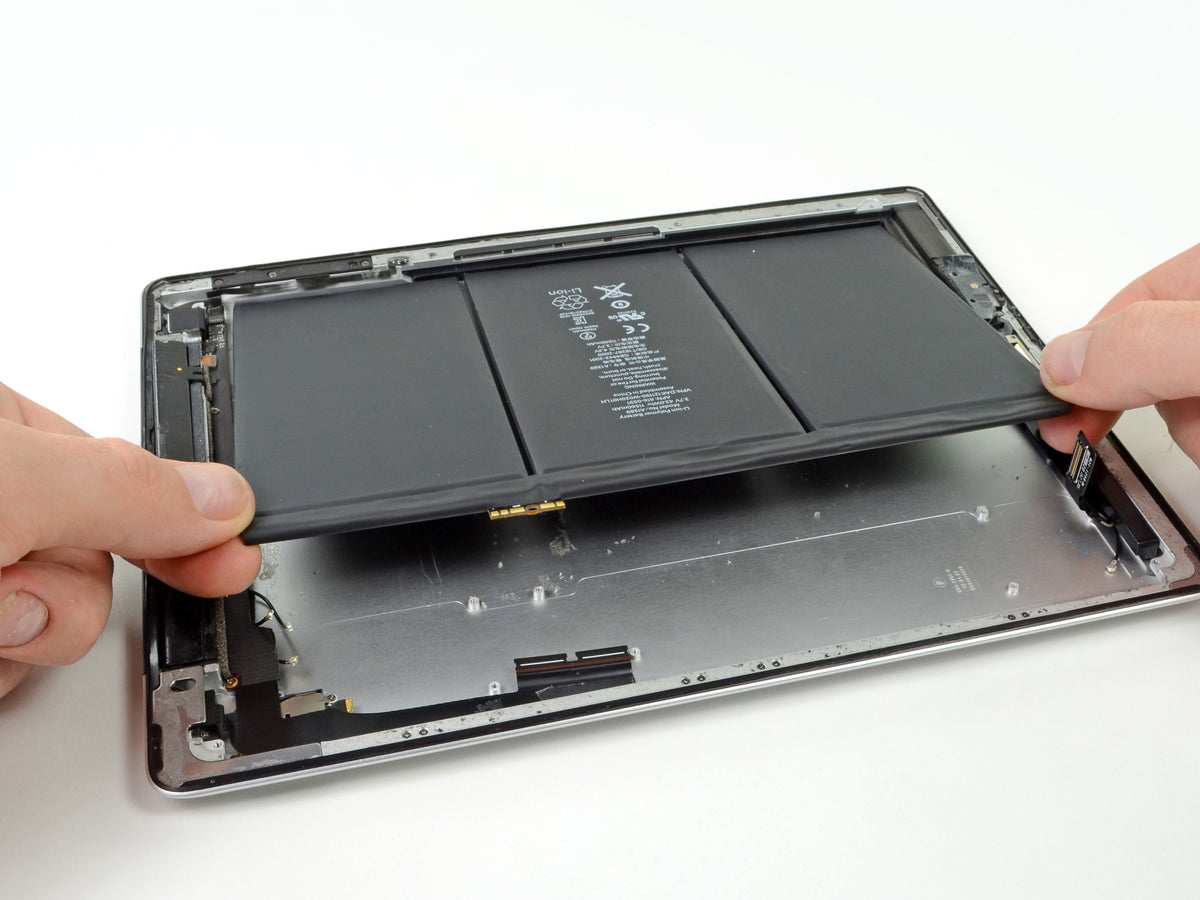
If your iPad switches off suddenly at 20–30% charge, won't hold a charge overnight, or has started to bulge slightly along one edge, the battery is almost certainly the cause. But which battery you need depends entirely on which iPad you own. Apple has released dozens of distinct iPad models since 2010, and the Air, Pro, Mini and standard ranges each use several different battery capacities across their generations — a battery that fits an iPad Air 4 will not fit an iPad Air 2, even though the two look almost identical from the outside.
Before buying anything, find your exact model number (covered below). Once you have it, matching it to a battery is straightforward: E-Tech61 stocks replacement batteries across the Air range from £12.99, the Pro range from £14.99, and the Mini and standard 10.2in ranges from £9.99, each specified against the Apple model numbers it fits. This guide covers model identification, a full compatibility table, what Apple's Battery Health screen actually shows on iPad — it isn't universal, unlike iPhone — and an honest comparison of DIY fitting against professional replacement, because iPad batteries are built and bonded differently to iPhone batteries.
How to identify your exact iPad model
Every iPad has two identifiers that matter for parts buying: a marketing name (like "iPad Air") and an Apple model number (like A1567). The marketing name tells you almost nothing useful for battery compatibility on its own, because Apple has reused names across generations with completely different internals. The model number is what actually determines which battery fits.
To find it on the device: open Settings > General > About. The "Name" field shows the marketing name. Below it, "Model Number" shows a code starting with a letter such as M (for example, MQDA2) — this identifies the storage size and region, not the hardware generation. Tap that model number once and it toggles to show the A-number (for example, A1567), which is the reference used by parts suppliers, including E-Tech61's own product listings.
If the iPad won't power on, the model number is printed on the back, in small text below the word "iPad", near the regulatory markings. It's genuinely tiny — a phone camera zoomed in, or a loupe, makes it legible. Once you have the A-number, cross-check it against Apple's own Identify your iPad model reference page, which lists every generation against its exact model numbers.
This step matters more than it sounds. An iPad Air 2 (A1566/A1567) takes a 7,340mAh battery. The iPad Air 3, released five years later but sharing a very similar 9.7–10.5in form factor and the same "Air" name, takes an 8,134mAh battery of a different physical design. Ordering by name or by screen size alone is how the wrong battery ends up on someone's doorstep. One thing that doesn't usually matter: Wi-Fi-only and Wi-Fi+Cellular versions of the same generation almost always share the same battery, so you don't need to track down your specific connectivity variant — just the generation.
Which iPad battery fits which model?
Once you have your model number, use the table below to find the matching battery. Prices and stock were checked directly on the E-Tech61 site on 21 September 2026 — always confirm current price and stock on the linked product page before ordering, since both can change.
| Family | iPad Model | Battery Capacity | E-Tech61 Price* | Shop |
|---|---|---|---|---|
| Standard | iPad 3 / iPad 4 | 11,560mAh | £14.99 | Shop iPad 3/4 battery |
| Standard | iPad Air (1st Gen) / iPad 5th–8th Gen (10.2in) | 8,827mAh | £14.99 | Shop 10.2in iPad battery |
| Air | iPad Air 2 | 7,340mAh | £12.99 | Shop iPad Air 2 battery |
| Air | iPad Air 3 | 8,134mAh | £21.99 | Shop iPad Air 3 battery |
| Air | iPad Air 4 | 7,606mAh | £21.99 | Shop iPad Air 4 battery |
| Pro | iPad Pro 9.7in | 7,306mAh | £14.99 | Shop iPad Pro 9.7in battery |
| Pro | iPad Pro 10.5in | 8,134mAh | £14.99 | Shop iPad Pro 10.5in battery |
| Pro | iPad Pro 12.9in (1st Gen) | 9,237mAh | £15.99 | Shop iPad Pro 12.9in 1st Gen battery |
| Pro | iPad Pro 12.9in (2nd Gen) | 10,994mAh | £18.99‡ | Shop iPad Pro 12.9in 2nd Gen battery |
| Mini | iPad Mini 1 | 4,440mAh | £9.99 | Shop iPad Mini 1 battery |
| Mini | iPad Mini 2 / Mini 3 | 6,471mAh | £12.99 | Shop iPad Mini 2/3 battery |
| Mini | iPad Mini 4 | 5,124mAh | £9.99† | Shop iPad Mini 4 battery |
| Mini | iPad Mini 6 | Not stated by supplier | £20.99 | Shop iPad Mini 6 battery |
*Prices shown are the sale price at time of checking; confirm the current price on the product page. †Showed as out of stock at time of checking — use the "notify me" option or check current availability before ordering. ‡Showed conflicting stock signals at time of checking — confirm current stock on the product page before ordering.
A pattern worth noting: battery capacity doesn't track screen size in a straight line. The 9.7in iPad Pro carries a smaller battery (7,306mAh) than the 10.2in standard iPad (8,827mAh) from a later generation, because internal design, display technology and chassis thickness changed between them. Always match by model number, not by screen size or family name.
Battery symptoms, and what "Battery Health" actually shows on iPad
Not every charging complaint is a battery fault. Rule out software and connection issues first — a battery you don't need is money you didn't need to spend.
| Symptom | Usually points to |
|---|---|
| Shuts down suddenly with 20–30% shown as remaining | Battery wear |
| Drains fast even in standby, with Low Power Mode making little difference | Software/settings — check Background App Refresh, Location Services and push mail first |
| Won't charge unless the cable is held at an angle | Charging port or cable fault, not the battery |
| Charges very slowly, or stops charging before 100% | Cable/adapter wattage, or battery wear |
| Visible bulge, a screen lifting at the edges, or the back case popping open | Battery swelling — a safety issue; stop charging and using it immediately |
| Battery percentage jumps or resets unexpectedly | Battery wear or a calibration fault |
For anything in the "software" row, Settings > Battery on iPad shows a usage breakdown by app over the last 24 hours and 10 days, which is a genuinely useful first diagnostic step before assuming hardware failure. Apple's own guidance on drains that happen too quickly covers the same checks in more depth.
Where iPad differs meaningfully from iPhone is Battery Health itself. On iPhone, a Maximum Capacity percentage in Settings has been available for years across most models. On iPad, Apple's native Settings > Battery > Battery Health screen — showing Maximum Capacity, Cycle Count and a Normal/Service status — is currently limited to iPad Pro (M4 and M5), iPad Air (M2, M3 and M4), iPad mini (A17 Pro) and iPad (A16), confirmed on Apple's own support page. Every model in the compatibility table above predates these chips, so none of them will show this screen — there is no missing setting to hunt for; it simply isn't there yet on older hardware. For those iPads, symptoms (the table above) and battery age are your practical indicators, not an on-screen percentage. As a general reference point, Apple's own out-of-warranty battery service guidance treats capacity retention below 80% as the threshold for service eligibility — a useful benchmark even when your iPad can't show you the number directly.
Current E-Tech61 iPad batteries
Five listings cover the models most commonly replaced.
The iPad Air 2 battery (7,340mAh, £12.99, in stock) fits A1566/A1567 and is one of the more frequently replaced packs in the range, given how long this generation has been in circulation. The listing ships with adhesive pre-applied to the cell.
The iPad Air 4 battery (7,606mAh, £21.99, in stock) fits A2316/A2324/A2325/A2072. It's a newer, higher-density cell than the Air 2's, which is reflected in the price difference between the two listings.
For the widest single compatibility span, the 10.2in iPad battery (8,827mAh, £14.99, in stock) covers iPad Air 1 and iPad 5th through 8th generation under one 8,827mAh SKU — five model years on a single part, which is worth checking first if your device falls in that range.
The iPad Pro 12.9in 2nd Gen battery (10,994mAh, £18.99) fits A1670/A1671/A1821 and is the largest capacity in the standard Pro line-up. Stock showed conflicting signals when checked — confirm current availability on the product page before ordering.
The iPad Mini 4 battery (5,124mAh, £9.99) fits A1538/A1546/A1550 and ships with adhesive pre-applied. It showed out of stock at the time of checking — use the notify option or check back before planning a repair around it.
Part cost vs professional replacement
Part-only prices in the table above run from £9.99 to £21.99 depending on model — a small fraction of what a full repair typically costs once labour is included. That gap is the real decision point.
Fitting the battery yourself means paying only for the part, plus tools if you don't already own them, and your own time. It carries the highest risk of accidental damage, covered in the next section, and it's not always covered by a returns policy once the seal on a device has been broken — check the returns terms on the exact product page before you open anything.
An independent repair shop charges labour on top of the part. Ask for a fitted price quote before booking, since labour for iPad battery work tends to run higher than iPhone battery work, for the same reasons covered below — more of the technician's time goes into removing and re-sealing the display safely.
Apple and Apple Authorised Service Providers offer official battery service too, and Apple's guidance states that batteries retaining less than 80% of original capacity qualify for service. Pricing varies by model and changes over time, so check Apple's current iPad repair pricing directly rather than relying on a figure quoted elsewhere — this guide won't repeat a number that may already be out of date by the time you read it.
Why iPad battery replacement is harder than iPhone
This isn't a difference to gloss over. iFixit's repairability scoring rates the iPhone 16 at 7 out of 10, largely because recent iPhones let you access the battery from the back of the handset without removing the screen at all. The M4 iPad Pro scores just 3 out of 10 on the same scale, and the reason is structural, not incidental.
On every iPad, the display is the only route inside, and it comes off first — full stop. There's no back-panel shortcut. Getting it off cleanly involves working around a full perimeter of adhesive strips bonding glass to chassis, in a process that can run to 30 or more individual steps once you include disconnecting cameras, sensors, speaker assemblies and flex cables that sit between the glass and the battery. A cracked digitiser from a rushed pry is a far more expensive mistake than the battery itself.
The battery underneath is a lithium-polymer pouch cell, bonded flat against the rear housing with its own separate adhesive strips — not the smaller cylindrical or modular cells some other devices use. Pouch cells are genuinely dangerous if punctured, bent sharply or heated directly: they can vent, swell rapidly or catch fire. Any DIY guidance that tells you to simply "pop it out" with a metal tool is not guidance worth following on an iPad specifically. If you're not confident stripping and re-sealing a bonded display without cracking it, and handling a pouch cell without flexing or piercing it, professional fitting is the safer route — not because the part is complicated, but because everything around it is.
Tools, adhesive and what not to improvise
If you're fitting the battery yourself, budget for the job properly rather than improvising with what's in a kitchen drawer.
Plastic opening tools and picks are essential — metal spudgers and screwdrivers have no place near a battery pouch, because a slip that would scratch plastic can puncture a cell. A heat source (a heat gun on low, or a dedicated heating pad) softens the original display adhesive enough to lift it without cracking the glass; working cold significantly raises the risk of a snapped digitiser cable.
Check whether adhesive is included before you order tools separately. Some E-Tech61 iPad batteries — including the Air 2 and Mini 4 listings above — ship with adhesive pre-applied to the new cell, which removes one variable from the job. Others don't, and you'll need fresh adhesive strips rated for the job rather than generic tape, which won't hold the display flush over time and won't seal out dust or moisture the way the original bonding did.
Anti-static precautions matter more on a device with as many exposed flex connectors as an iPad. Work on a static-safe surface, handle cables by their connectors rather than the ribbon itself, and photograph the cable routing before you disconnect anything — it's the cheapest insurance against a reassembly mistake.
Never puncture, bend sharply or apply concentrated heat directly to the battery pouch itself, during removal or fitting. If the old battery is already swollen, treat it as compromised: don't press it flat, don't continue charging it, and don't store it near anything flammable while you wait for the replacement to arrive.
Purchase checklist
Before you add a battery to your basket:
- Confirm your exact model number via Settings > General > About, or the etched text on the back if the device won't power on.
- Match that model number against the compatibility table above — not the marketing name, not the screen size.
- Check the live price and stock status on the exact product page linked above; both can change after this guide was checked.
- Decide DIY vs professional fitting based honestly on your comfort removing a bonded display and handling a pouch cell, not just on cost.
- If fitting it yourself, confirm whether adhesive is included with your specific listing, and order fresh adhesive strips and plastic tools if it isn't.
- Check the returns window on the product page before you open the device — once a seal is broken, return eligibility can change.
- If the current battery is visibly swollen, stop using the iPad and handle it as a safety issue, regardless of which route you take next.
Frequently asked questions
Does my iPad show a Battery Health percentage like my iPhone?
Only on the newest chip generations. Apple's native Battery Health screen (Settings > Battery > Battery Health) currently covers iPad Pro (M4/M5), iPad Air (M2/M3/M4), iPad mini (A17 Pro) and iPad (A16) only. Every model in the compatibility table above is older than that and won't show a Maximum Capacity percentage — go by the symptoms table instead.
How do I tell if it's the battery and not the charging port or software?
Sudden shutdowns at 20–30% remaining, a visible bulge, or the case popping open all point to the battery. Fast drain in standby, or charging only when the cable is held at an angle, usually point to software settings or the charging port instead — check those first.
Can I fit an iPad battery myself?
Yes, but it's a genuinely harder job than an iPhone battery swap. The display has to come off first on every iPad, involves more adhesive and more connected components, and the battery itself is a pouch cell that must not be punctured or bent. If you're not confident with that process, professional fitting is the safer choice.
How much does an iPad battery replacement cost in the UK?
The part alone runs £9.99–£21.99 depending on model, per the table above. Add labour if you're not fitting it yourself — ask any independent shop for a fitted quote before booking. For Apple's own official service pricing, check Apple's current iPad repair page directly, since it varies by model and changes over time.
Will a new battery fix an iPad that keeps switching off unexpectedly?
Usually, if the shutdowns happen at 20–30% remaining and nothing else explains them. Rule out Background App Refresh, Location Services and push mail first using Settings > Battery's usage breakdown — those can mimic battery wear without it actually being the cause.
Are E-Tech61 iPad batteries genuine Apple parts?
No — these are aftermarket replacement batteries specified to match the capacity and model numbers of the original Apple part for each generation, not Apple-branded components. Check the individual product page for full specification detail before ordering.
What should I do if my iPad battery looks swollen?
Stop charging and using the device immediately. Don't press on the bulge, don't attempt to flatten it, and keep it away from flammable surfaces while you arrange a replacement. This applies whether you plan to fit the new battery yourself or hand it to a technician.
Shop the right battery for your iPad
Match your model number to the compatibility table above, then go straight to that product page to check today's price and stock before ordering. If you already know your model, jump straight to the iPad Air 4 battery, the 10.2in iPad battery covering iPad Air 1 and iPad 5th–8th Gen, or the iPad Pro 12.9in 2nd Gen battery — otherwise, find your exact model number first and use the full table to pick the right part.
Share:
How Much Does iPad Screen Repair Cost at E-TECH61?
Buy Charging Cable for Oppo Online | Charging Cable for Oppo